
Trip.com: Book Flights, Hotels
Trip.comTravel & Local
4.73.44K Reviews
- Version
- 8.60.0
- Installs
- 50.00M
- Age Rating
- Everyone
Screenshots

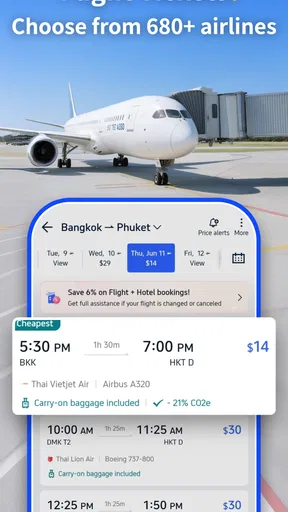

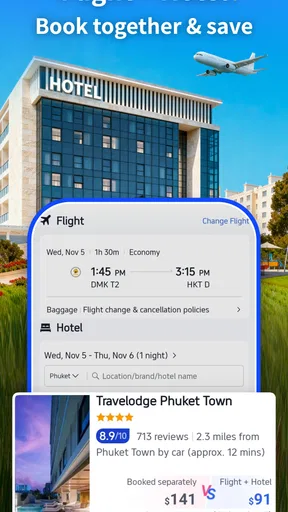



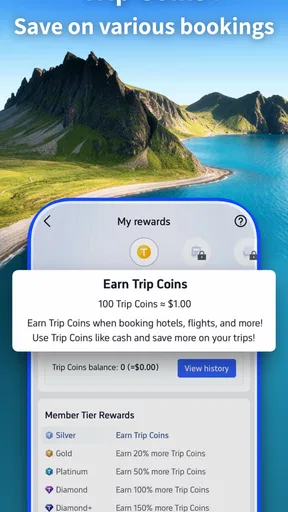
Our Review of Trip.com: Book Flights, Hotels
 Analysis by Appyee
When I need to organize a trip without jumping between several travel websites, Trip.com: Book Flights, Hotels is the kind of app I would try first. It brings flight and hotel searching into one Travel & Local app, and its free access makes it easy to explore before committing to anything. I found it most useful as a planning workspace rather than as a simple booking button: I can compare options, adjust dates, check different accommodation styles, and keep the practical details of a journey in one place.
The app is developed by Trip.com and has been available since July 31, 2013. Its current version is 8.56.0, and it runs on Android 7.0 or later. With an average rating of 4.7 from around 922,000 ratings and more than 50 million installs, it is clearly established rather than a little-known travel utility. Those figures do not guarantee that every booking experience will be smooth, but they do suggest that many travelers find the app useful enough to keep using.
How Trip.com fits into real trip planning
The main appeal is concentration. Instead of opening one app for flights, another for hotels, and perhaps a browser for destination research, I can begin with the broad shape of a trip and narrow it down. That is especially handy when the destination is flexible. I might start by checking flight dates, then move the trip by a day or two, and immediately see whether the accommodation choices still make sense.
This combined approach also changes how I think about value. A cheap flight is not necessarily a cheap trip if the hotel is far from where I need to be, while a slightly more expensive flight may work better when it avoids an awkward arrival time. Trip.com is useful because it encourages me to judge those parts together. I still need to read the individual conditions carefully, but the app makes it practical to compare the whole outline of a journey instead of focusing on one isolated price.
For a straightforward weekend away, the workflow feels natural. I can search the route, inspect the available travel times, then look for a hotel that matches the arrival and departure schedule. For a longer trip, the same setup helps me think in stages. I can consider whether one central hotel is better than several cheaper stays, or whether changing the dates creates a more manageable itinerary.
What the free access really means
Trip.com is free to download and use, which is important when judging its value. I can browse travel choices and plan without paying an upfront app fee. That does not mean the trip itself is free: flights, rooms, taxes, optional services, and any conditions attached to a booking remain separate purchase decisions. I would treat the app as a free planning and booking interface, not as a promise of a particular final cost.
This distinction is easy to overlook when a travel app emphasizes deals. I would compare the final amount shown for the exact dates and travelers, then check what is included before deciding. A low starting figure may not suit me if it comes with restrictive changes, limited baggage, an inconvenient room arrangement, or a cancellation condition I cannot accept. The free app access is genuine value for research, but the paid value of any trip depends on the specific option selected.
I also like that free access lowers the risk of trying the service for a particular journey. If I am only investigating a destination, I do not have to pay simply to see whether the route or hotel supply is suitable. On the other hand, I would not install it expecting every choice to be cheaper than booking directly. The sensible comparison is between the complete terms and total cost, not just the first attractive figure in a search result.
A realistic use case: arranging a short work trip
Imagine I have to attend a two-day meeting in another city. I know the meeting location but have some flexibility around the travel dates. I would first search flights that allow enough time to arrive without turning the day before into a stressful journey. Then I would inspect hotels near the relevant area, paying attention to the arrival time and the length of the stay rather than choosing solely by nightly cost.
The useful part is the ability to revise the plan while keeping the same goal in view. If an early flight forces me to pay for an extra night, a later flight may be better overall. If a hotel looks inexpensive but requires a long transfer, its practical value may be lower for a short business visit. This is one of the app's less obvious strengths: it supports trade-off thinking between transport and accommodation, which is more realistic than treating them as unrelated purchases.
Before booking, I would save the important details outside my memory: departure time, arrival airport, hotel address, check-in conditions, and the rules for changes or cancellation. Travel apps can make a plan look tidy while the small restrictions remain easy to miss. My advice is to use the app for comparison, but slow down at the final review screen and read the exact conditions attached to the selected option.
Useful habits that improve the search
My first practical tip is to search with flexible dates whenever the journey allows it. Even moving a trip by a day can change the balance between flight and hotel costs, and the best result may not be the cheapest individual item. I would compare at least two complete combinations: one optimized for the lowest total, and another optimized for better times or location.
My second tip is to separate “possible” from “comfortable.” A connection that technically works may leave little room for delays, while a hotel that appears close on a map may be inconvenient if the route from the airport is awkward. I use the app to create a shortlist, then judge each option against the actual purpose of the trip. A family holiday, a quick city break, and a work appointment should not be evaluated by the same standard.
My third tip is to check the booking details immediately after completing a reservation. I would confirm the names, dates, airports, room type, and any included or excluded services while the information is fresh. Keeping confirmation details accessible is particularly important when a trip includes several bookings. The app can centralize much of the planning, but I still consider my own backup notes worthwhile.
Where the app delivers genuine value
The strongest value comes from reducing planning friction. I do not have to begin with a fully formed itinerary. I can start with a destination and dates, discover what is realistic, and then shape the trip around the available choices. That makes the app suitable for travelers who want to explore possibilities before deciding, not only for people who already know the exact flight and hotel they want.
It is also helpful for comparing convenience against cost. A hotel with a better location may save time and transport effort, while a different flight schedule may make the first or last day more useful. The app does not make those decisions for me, but it puts the relevant choices close enough together that I can make them deliberately.
Another advantage is continuity. When I plan on a phone, I want to return to the same trip without reconstructing every search from memory. A travel-focused app is more comfortable for that repeated process than a collection of disconnected browser tabs. I can use it during the early research stage, return when dates are confirmed, and revisit the arrangements as departure gets closer.
The developer's long presence in the category also matters to me as a practical consideration. Trip.com has been around since 2013, and its large install base and substantial volume of ratings indicate that it is not an experimental newcomer. I still judge each reservation on its own terms, but I am more comfortable using an established travel platform for a complicated search than relying on an unfamiliar app with little history.
Trade-offs I would consider before relying on it
The biggest limitation is that convenience can encourage rushed decisions. Having flights and hotels together feels efficient, but it can also make me move from search to purchase before checking every condition. Travel bookings are rarely judged fairly by the headline amount alone. I need to inspect flexibility, timing, location, and what happens if plans change.
Another trade-off is that a broad marketplace can produce too many choices. That is useful when I want to compare, but tiring when I need a quick answer. I would narrow the search early by setting realistic dates, preferred areas, and acceptable travel times. Without that discipline, browsing can become a long sequence of attractive but unsuitable options.
I would also avoid assuming that an in-app deal is automatically the best deal available. The app's store summary highlights exclusive travel deals and customer service, but my own decision would still be based on the complete booking terms. For an important trip, I would compare the final offer with the airline or hotel's direct option, especially if loyalty benefits, direct support, or unusual flexibility matter more to me than convenience.
Customer support is another area where expectations should remain practical. The app presents itself as offering customer service, which is valuable when an itinerary changes or a booking needs attention. Still, support cannot remove every restriction imposed by a fare, room, airline, or property. I would keep the reservation number and relevant conditions available, explain the issue clearly, and avoid assuming that a support request automatically means a refund or free change.
Who is most likely to benefit
I think Trip.com is a good fit for travelers who want one place to research flights and hotels, especially when dates or destinations are still adjustable. It suits people arranging leisure trips, short breaks, family travel, and work journeys where the relationship between arrival time and accommodation matters. It is also useful for anyone who prefers planning on a phone and wants free access before making a paid travel decision.
It may be particularly valuable for a traveler who is comparing several versions of the same trip. For example, I might weigh a cheaper flight with a less convenient schedule against a better-timed option paired with a different hotel. The app supports that kind of practical comparison better than a narrow flight-only or hotel-only tool.
I would be more cautious if I already have strong reasons to book directly. Travelers who depend on an airline's loyalty program, need highly specialized accommodation, or want a direct relationship with a hotel may prefer the provider's own app or website. The same applies when a trip is unusually complex and every change must be handled by one specific operator. In those cases, the convenience of an intermediary may not outweigh the value of direct control.
I would also skip it as my only planning tool if I need extensive destination guidance rather than booking assistance. Trip.com is centered on arranging travel, not replacing personal research about neighborhoods, local transport, visa requirements, or safety. I would use it alongside reliable destination information, particularly for international journeys where practical details can matter more than the booking screen.
Device support and everyday accessibility
On Android, the app supports devices running version 7.0 or newer, so it is available to many people using older phones as well as recent models. Its content rating is Everyone, which makes the app broadly suitable from an age-classification standpoint. Those details make it approachable for a household where different people may help with the same travel plan.
I would still make sure the phone has enough battery and reliable connectivity before using the app during a journey. Searching and reviewing bookings on a small screen is convenient, but it is not the moment to discover that I have forgotten a confirmation detail or cannot load an important screen. My preferred workflow is to complete the main planning while I have stable internet, then keep the essential itinerary information available for the travel day.
The app's free status also makes it easy to install for a single trip and remove later if I do not travel often. Frequent travelers may get more value from keeping it available because repeated searches and bookings make the centralized workflow more worthwhile. Occasional travelers should judge it by whether it simplifies the particular journey, not by how many features they might use in the future.
My final buy-or-skip judgment
I would recommend trying Trip.com when I want to compare flights and hotels together without paying an app access fee. Its best quality is not simply that it displays travel options; it helps me think about the total shape of a journey, including timing, location, and the compromises hidden behind a low starting price. That makes it more useful than a basic search shortcut for flexible trip planning.
I would not treat it as an automatic guarantee of the lowest final cost, and I would not book without reading the conditions attached to the exact fare or room. Comparing direct alternatives remains sensible when loyalty benefits, special support, or unusual flexibility are important. The app is strongest when convenience and broad comparison are my priorities.
For me, the verdict is a qualified yes. The free access makes experimentation easy, the established platform gives it practical credibility, and the combined flight-and-hotel workflow can save real planning time. I would install it for a city break or a work trip, build two or three complete options, check the final terms carefully, and then choose the booking that offers the best balance rather than chasing the most eye-catching figure.
My recommendation: use Trip.com as a careful comparison and booking companion, not as a substitute for reading the details. Travelers who approach it that way are most likely to get meaningful value from what the app offers, while those who need direct-provider benefits or highly specialized arrangements may be better served elsewhere.
Privacy and Permissions
See what permissions an app requests and how it handles your data.
- Calendar
- read calendar events plus confidential information, add or modify calendar events and send email to guests without owners' knowledge
- Location
- approximate location (network-based), precise location (GPS and network-based)
- Photos/Media/Files
- read the contents of your USB storage, modify or delete the contents of your USB storage
- Storage
- read the contents of your USB storage, modify or delete the contents of your USB storage
- Camera
- take pictures and videos
- Microphone
- record audio
- Wi-Fi connection information
- view Wi-Fi connections
- Other
- view network connections, connect and disconnect from Wi-Fi, control flashlight, measure app storage space, full network access, change your audio settings, control Near Field Communication, draw over other apps, control vibration, prevent device from sleeping
Verdict
Strengths of Trip.com: Book Flights, Hotels
- Wide selection of flights, hotels, trains, and travel activities
- Competitive prices with frequent member-only deals
- Useful filters make comparing travel options straightforward
- Trip management keeps bookings and itineraries in one place
- Customer reviews help assess hotels before booking
Limitations of Trip.com: Book Flights, Hotels
- Some discounted fares have strict cancellation conditions
- Prices may change before payment is completed
- Support quality can vary depending on the booking provider
- Extra fees may appear for baggage or optional services
- Hotel information and room details are not always consistent
Similar Picks in This Category
View All
Google Maps
Google LLC3.4

Google Maps Go
Google LLC4.1

Booking.com: Hotels & Travel
Booking.com Hotels & Vacation Rentals4.8

Google Earth
Google LLC3.8

Skyscanner Flights Hotels Cars
Skyscanner Ltd4.8

trivago: Compare hotel prices
trivago N.V.4.4
Frequently Asked Questions
What can I book with Trip.com?
Trip.com is a travel booking app that brings several services together in one place. You can search and reserve flights, hotels, trains, car rentals, airport transfers, tours, and selected activities, depending on your destination. During testing, the app made it easy to compare dates, prices, baggage options, room types, and cancellation policies before completing a reservation.
Is Trip.com safe and reliable for booking travel?
Trip.com is a well-known online travel agency that uses standard booking and payment procedures, including account security features and confirmation details for reservations. However, the app acts as an intermediary, so the final terms may come from the airline, hotel, or local provider. Always check the provider name, cancellation rules, payment currency, and confirmation information before traveling.
Can I cancel or change a reservation made through Trip.com?
Cancellation and modification options depend on the specific booking. Some flights and hotel rooms are fully refundable, while others may be non-refundable or involve service and fare differences. Open the reservation in the app and review its policy before requesting a change. For complicated cases, Trip.com support may need to coordinate with the airline or property.
Does Trip.com offer customer support if something goes wrong?
The app provides customer service through its help and booking-management sections, with support availability varying by country, language, and reservation type. You can usually access booking details, request assistance, and check the status of a case from your account. Response times may differ, especially during flight disruptions, so keep confirmation numbers and provider contact details available.
Are the prices shown in Trip.com final, and are there extra fees?
Trip.com generally displays important pricing information during the search and checkout process, but the final amount can depend on taxes, payment methods, baggage, hotel fees, currency conversion, and optional extras. Before confirming, review the complete price breakdown and the selected fare or room conditions. Comparing the total cost—not only the initial advertised price—is recommended.
